Apple’s GameKit framework provides a turn-based multiplayer system through GKTurnBasedMatch that handles the heavy lifting of asynchronous online play: match creation, push notifications, and server-side state storage. Players take turns without needing to be online simultaneously, making it well suited for board games, card games, and strategy titles.
What GameKit does not do is manage your game logic. It is a transport layer — it stores your match data as an opaque blob and routes turn notifications. All game logic, validation, and state management is your responsibility.
This article walks through the complete lifecycle of a turn-based match, from authentication through cleanup, drawing on practical experience from building Four In Space 3D, a 3D Connect Four game with online multiplayer.
Authentication
Before any multiplayer functionality is available, the local player must authenticate with Game Center. Set the authentication handler early — ideally in application(_:didFinishLaunchingWithOptions:) or when the user first accesses multiplayer features.
func authenticatePlayer() {
    GKLocalPlayer.local.authenticateHandler = { [weak self] viewController, error in
        guard let self else { return }

        if let error {
            self.enableGameCenter = false
            return
        }

        if let viewController {
            self.authenticationController = viewController
            NotificationCenter.default.post(
                name: .PresentAuthenticationViewController, object: nil
            )
            return
        }

        if GKLocalPlayer.local.isAuthenticated {
            self.enableGameCenter = true
            NotificationCenter.default.post(
                name: .LocalPlayerIsAuthenticated, object: nil
            )
        }
    }
}
Three things to keep in mind. First, the handler may be called multiple times — the system invokes it again if the authentication state changes, for example when the user signs out in Settings. Second, never cache authentication state; always check GKLocalPlayer.local.isAuthenticated before making GameKit calls. Third, the handler fires on a background queue, so dispatch any UI work to the main queue.
Match Discovery and Creation
Creating a New Match
Use GKTurnBasedMatch.find(for:) with a configured GKMatchRequest:
let request = GKMatchRequest()
request.minPlayers = 2
request.maxPlayers = 2

GKTurnBasedMatch.find(for: request) { match, error in
    guard let match else { return }

    let initialGameData = createInitialGameState()
    let opponents = match.participants.filter {
        $0.player?.gamePlayerID != GKLocalPlayer.local.gamePlayerID
    }

    match.endTurn(
        withNextParticipants: opponents,
        turnTimeout: 86400,
        match: initialGameData
    ) { error in
        if let error {
            // Match was created but the first turn submission failed
        }
    }
}
Loading Existing Matches
A subtle but important point: the matches returned by GKTurnBasedMatch.loadMatches() may contain stale data. Always reload each match with GKTurnBasedMatch.load(withID:) before using its matchData or participants.
GKTurnBasedMatch.loadMatches { matches, error in
    guard let matches else { return }
    for match in matches {
        GKTurnBasedMatch.load(withID: match.matchID) { freshMatch, error in
            guard let freshMatch else { return }
            // freshMatch now has current matchData and participant states
        }
    }
}
Preventing Race Conditions on Reload
When the user can trigger rapid reloads — pull-to-refresh, view transitions — a slow completion handler from an earlier load can overwrite results from a newer one. Guard against this with a UUID pattern:
private var currentLoadID: UUID?

func loadMatches() {
    let loadID = UUID()
    currentLoadID = loadID

    GKTurnBasedMatch.loadMatches { [weak self] matches, error in
        guard let self, self.currentLoadID == loadID else { return }
        // Process matches safely
    }
}
This pattern is applicable whenever you have an async operation that can be re-triggered before the previous invocation completes.
Match Data Serialization
GameKit stores your match data as an opaque Data blob with a maximum size of 256 KB. You control the format entirely. There are two common approaches.
Fixed-Size Struct
If your game logic is in C or C++, serialize the state struct directly:
func serialize(_ gameState: GameState) -> Data {
    var state = gameState
    return Data(bytes: &state, count: MemoryLayout<GameState>.size)
}

func deserialize(_ data: Data) -> GameState? {
    guard data.count >= MemoryLayout<GameState>.size else { return nil }
    return data.withUnsafeBytes { $0.load(as: GameState.self) }
}
This gives you zero-cost serialization but requires careful attention to struct layout changes across app versions.
Codable
For pure Swift games, Codable is more flexible:
struct MatchState: Codable {
    let version: Int = 1
    var moves: [Move]
    var currentPlayerIndex: Int
}
Whichever approach you choose, always include a version field. When you release an update that changes the format, the version byte lets you migrate older match data gracefully instead of corrupting active matches.
A Note on Index Conventions
If your game logic uses 0-based indices internally but your UI uses 1-based indices, choose one convention for the serialized format and convert consistently. Off-by-one errors in serialized match data cause moves to land in wrong positions — one of the hardest bugs to track down because both players see different game states.
Turn Management
Submitting a Turn
Always verify it is the local player’s turn before calling endTurn. Use gamePlayerID for the comparison — never compare GKPlayer objects directly or rely on array indices.
func submitTurn(match: GKTurnBasedMatch, matchData: Data,
                completion: @escaping (Bool) -> Void) {
    let localPlayerID = GKLocalPlayer.local.gamePlayerID

    guard match.currentParticipant?.player?.gamePlayerID == localPlayerID else {
        completion(false)
        return
    }

    let opponents = match.participants.filter {
        $0.player?.gamePlayerID != localPlayerID
    }

    match.endTurn(
        withNextParticipants: opponents,
        turnTimeout: 86400,
        match: matchData
    ) { error in
        DispatchQueue.main.async { completion(error == nil) }
    }
}
Receiving a Turn
Register as a GKLocalPlayerListener to receive turn events:
func player(_ player: GKPlayer,
            receivedTurnEventFor match: GKTurnBasedMatch,
            didBecomeActive: Bool) {
    // 1. Extract the latest match data
    // 2. Deserialize opponent's move
    // 3. Update local game state
    // 4. Notify UI
}

func player(_ player: GKPlayer, matchEnded match: GKTurnBasedMatch) {
    // Match has ended — opponent finished the game or quit
}
Turn Timeouts
GameKit supports GKTurnTimeoutDefault (7 days), GKTurnTimeoutNone, or a custom value in seconds. When a participant times out, their matchOutcome is set to .timeExpired and the turn advances automatically.
Participant Architecture: The Strategy Pattern
One of the most valuable architectural decisions you can make is to decouple your match controller from the type of player it coordinates. Define an abstract participant interface:
class MatchParticipant {
    var positionInMatch: Int = 0
    var lastUserEvent: ParticipantInputEvent?

    func notifyTurn(_ matchData: Data?,
                    completion: @escaping (Bool) -> Void) { }
    func notifyEnd(_ matchData: Data?, outcome: MatchStatus,
                   completion: @escaping (Bool) -> Void) { }
}
Then implement concrete subclasses for each player type.
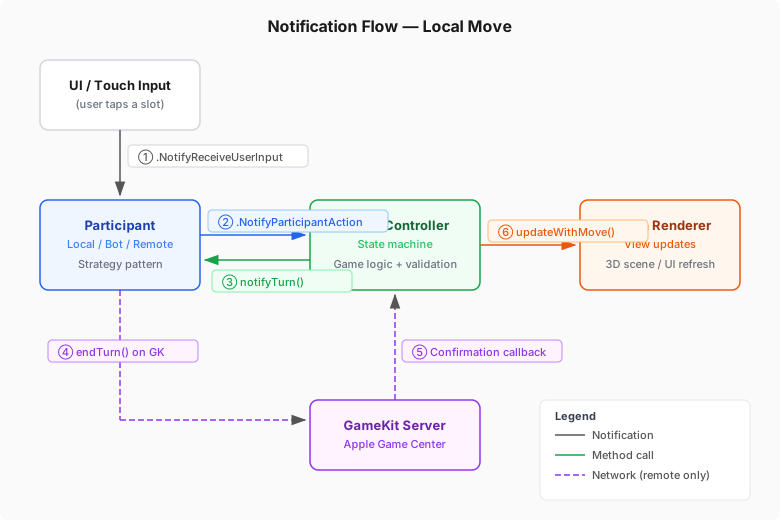
A LocalParticipant waits for UI input and forwards it to the match controller via notifications. It uses a waitForResponse gate to prevent processing input when it is not this participant’s turn.
A LocalBotParticipant computes moves on a background queue and posts results on the main queue, keeping the UI responsive during AI computation.
A RemoteParticipant bridges GameKit network calls with the local participant interface. It calls endTurn to submit the local player’s move and implements GKLocalPlayerListener to receive the opponent’s move.
The match controller does not know or care what kind of participant it is coordinating. The same controller code handles human vs. AI, human vs. human (local), and human vs. remote (online). This eliminates branching logic and makes each participant type independently testable.
The following diagram illustrates how a local move flows through the system — from the user’s tap through the participant, match controller, and renderer, with an optional network round-trip for remote matches:
State Synchronization
This is the hardest part of GameKit multiplayer. GameKit gives you a data blob and tells you whose turn it is. Keeping your local state consistent with the server is entirely on you.
The Player Position Problem
match.participants contains GKTurnBasedParticipant objects, but their array order is not guaranteed to correspond to game roles. Player A might be participants[0] in one match and participants[1] in another. You cannot use array position to determine who plays which role.
The solution is to derive the local player’s role from whose turn it is and how many moves have been played:
func deriveLocalPlayerRole(match: GKTurnBasedMatch,
                           currentGamePlayer: Int) -> Int {
    let isLocalTurn = match.currentParticipant?.player?.gamePlayerID
        == GKLocalPlayer.local.gamePlayerID

    return isLocalTurn ? currentGamePlayer : (currentGamePlayer + 1) % 2
}
In a two-player alternating game, if the game logic says “it’s player 0’s turn” and GameKit says “it’s your turn,” then you must be player 0. This holds regardless of participant array order.
Move Parity Validation
Player 0 always moves on even move counts, player 1 on odd counts. This invariant is a reliable validation tool:
| Move count | Game player | Parity |
|---|---|---|
| 0 (start) | Player 0 | Even |
| 1 | Player 1 | Odd |
| 2 | Player 0 | Even |
| 3 | Player 1 | Odd |
Snapshot-Based Rollback
Before applying any move, snapshot the current state. If the network call fails, restore the snapshot:
let snapshot = currentMatchData

applyMove(slot)

remoteParticipant.notifyTurn(updatedMatchData) { success in
    if success {
        self.saveState()
    } else {
        self.restoreState(from: snapshot)
        self.rebuildUI()
    }
}
This ensures the local display never shows a state that was not confirmed by the server.
Confirmation and Timeout Pattern
Network calls to GameKit can hang or fail silently. A confirmation timeout prevents the game from getting stuck in a “waiting for server” state indefinitely.
private var awaitingConfirmation = false
private var confirmationTimedOut = false
private var confirmationWork: DispatchWorkItem?

func startConfirmationTimeout() {
    confirmationWork?.cancel()
    confirmationTimedOut = false

    let work = DispatchWorkItem { [weak self] in
        guard let self, self.awaitingConfirmation else { return }
        self.confirmationTimedOut = true
        self.rollbackLastMove()
    }

    confirmationWork = work
    DispatchQueue.main.asyncAfter(
        deadline: .now() + 30.0, execute: work
    )
}
The following diagram shows both the success path and the timeout path, including how late callbacks are safely rejected:
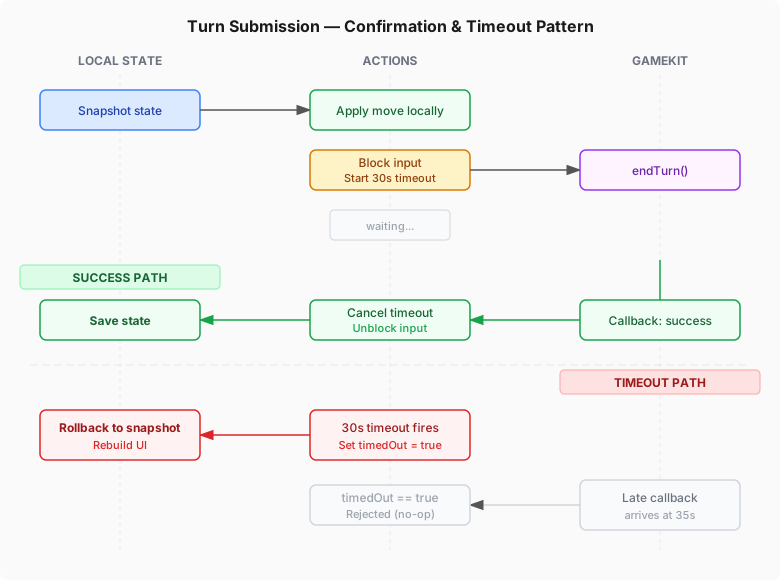
The confirmationTimedOut flag is critical. Without it, a late callback — arriving after the timeout has already triggered a rollback — would call saveState() on the rolled-back state, corrupting the game.
While awaiting confirmation, reject all new input:
@objc func participantAction(_ notification: Notification) {
    guard !awaitingConfirmation else { return }
    // Process action...
}
Match End and Outcome Reporting
GameKit provides two methods for ending a match, and choosing the wrong one is a common source of bugs:
| Method | When to Use |
|---|---|
endMatchInTurn(withMatch:) |
It is your turn — you set all participants’ outcomes |
participantQuitOutOfTurn(with:) |
It is not your turn — you only set your own outcome |
When ending a match in turn, iterate over all participants and set their outcomes before calling endMatchInTurn:
for participant in match.participants {
    if participant.player?.gamePlayerID == localPlayerID {
        participant.matchOutcome = localOutcome
    } else {
        participant.matchOutcome = opponentOutcome
    }
}

match.endMatchInTurn(withMatch: matchData) { error in
    // ...
}
Use .won and .lost (not .first / .second) unless you need ranked placement in games with more than two players.
Opponent Quit Handling
Opponents can quit at any time. You must check for quit in both receivedTurnEventFor and matchEnded:
func opponentDidQuit(_ match: GKTurnBasedMatch) -> Bool {
    let localPlayerID = GKLocalPlayer.local.gamePlayerID
    return match.participants.contains {
        $0.player?.gamePlayerID != localPlayerID
            && $0.matchOutcome == .quit
    }
}
When the opponent quits, the match data may not contain a new move. If you try to extract and replay a “last move” from a quit event, you will replay a stale or garbage move. Always check for quit before extracting moves:
func player(_ player: GKPlayer,
            receivedTurnEventFor match: GKTurnBasedMatch,
            didBecomeActive: Bool) {
    if opponentDidQuit(match) {
        finalizeMatchAfterOpponentQuit(match)
        lastUserEvent = ParticipantInputEvent(type: .cancel, data: nil)
    } else {
        let move = extractLastMove(from: match.matchData)
        lastUserEvent = ParticipantInputEvent(
            type: .turn, data: MoveData.encode(move)
        )
    }
    NotificationCenter.default.post(
        name: .NotifyParticipantAction, object: self
    )
}
When finalizing after a quit, use retry logic with a cap. endMatchInTurn can fail transiently, but retrying indefinitely is worse than leaving the match in an inconsistent state on the server.
Listener Lifecycle
This is one of the most error-prone areas. The rule is straightforward: exactly one GKLocalPlayerListener should be registered for a given match at any time.
Match List View appears
  -> Register MultiplayerTableVC as GKLocalPlayerListener

User selects a match
  -> Unregister MultiplayerTableVC
  -> Create RemoteParticipant
  -> Register RemoteParticipant as GKLocalPlayerListener

Match ends / user goes back
  -> Unregister RemoteParticipant
  -> Re-register MultiplayerTableVC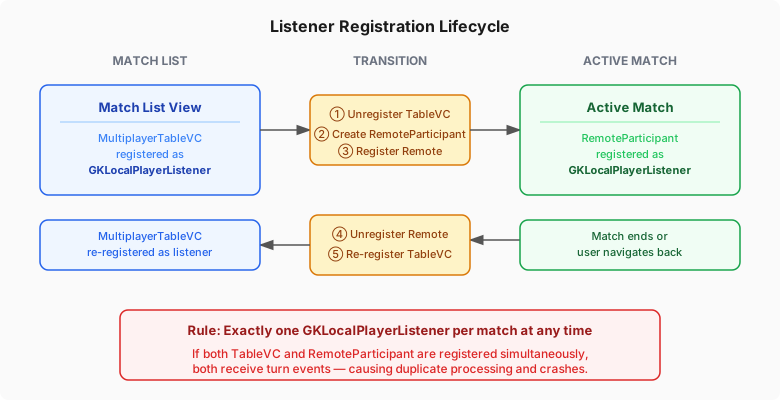
If you forget to unregister the table view controller before registering the remote participant, both will receive turn events, causing duplicate processing and potential crashes.
Register listeners in viewWillAppear and unregister in viewWillDisappear. Remove NotificationCenter observers in deinit.
Error Handling
GameKit defines approximately 30 error codes. The most relevant for turn-based matches:
| Code | Name | Meaning |
|---|---|---|
| 3 | communicationsFailure |
Network error |
| 6 | notAuthenticated |
Player not signed in |
| 17 | turnBasedMatchDataTooLarge |
Match data exceeds 256 KB |
| 19 | turnBasedInvalidParticipant |
Wrong participant tried to act |
| 20 | turnBasedInvalidTurn |
Not this participant’s turn |
| 21 | turnBasedInvalidState |
Match is in wrong state for operation |
Classify errors as transient or fatal. Transient errors (communicationsFailure, serverError, connectionTimeout) are worth retrying with exponential backoff up to a maximum count. Fatal errors (notAuthenticated, turnBasedInvalidTurn, turnBasedInvalidState, turnBasedMatchDataTooLarge) should trigger a rollback and inform the user.
General defensive patterns: always use [weak self] in async closures, dispatch all UI updates to the main queue, and re-validate match state after any async gap. GameKit callbacks may arrive on background queues, and match state can change between submitting a turn and receiving the callback.
Testing Strategies
GameKit classes (GKPlayer, GKTurnBasedMatch, GKTurnBasedParticipant) are not designed for testing — they have no public initializers for most properties. The practical approach is to subclass and override:
class MockTurnBasedMatch: GKTurnBasedMatch {
    var endTurnCalled = false
    var simulatedError: Error?

    override func endTurn(
        withNextParticipants: [GKTurnBasedParticipant],
        turnTimeout: TimeInterval,
        match: Data,
        completionHandler: ((Error?) -> Void)?
    ) {
        endTurnCalled = true
        completionHandler?(simulatedError)
    }
}
Focus your tests on:
- Serialization round-trips — encode a game state, decode it, verify equality
- State machine transitions — verify the match controller moves through states correctly
- Rollback on failure — simulate a network error and verify the state reverts to the pre-move snapshot
- Outcome mapping — verify that game results map to the correct GameKit outcomes for both player positions
- Opponent quit detection — verify that quit events produce cancellation signals, not move replays
- Corrupted data handling — feed garbage data into your deserializer and confirm it fails gracefully
Common Pitfalls
A condensed checklist for code review:
Match Data: Include a version field. Validate data size before reading. Keep index conventions consistent. Handle corrupted data without crashing.
Turn Submission: Only call endTurn when it is your turn. Snapshot state before moves for rollback. Implement confirmation timeouts. Guard against late callbacks. Block input during confirmation.
Player Identity: Compare with gamePlayerID, never object identity or array index. Derive game roles from turn parity, not participant array order.
Quit Handling: Check for quit in both listener callbacks. Produce cancellation signals on quit, not move replays. Use capped retry logic for match finalization.
Listener Lifecycle: One listener per match at a time. Unregister before registering a replacement. Clean up observers in deinit.
Async Safety: Use [weak self] everywhere. Dispatch UI to main queue. Re-validate state after async gaps. Guard rapid reloads with UUIDs.
Conclusion
GameKit’s turn-based system is powerful but demands careful attention to state management, error handling, and lifecycle coordination. The framework handles transport and notifications reliably; the complexity lies in keeping your local game state synchronized with what the server knows.
The patterns described here — the strategy pattern for participants, UUID-guarded reloads, snapshot-based rollback, confirmation timeouts, and systematic quit detection — form a foundation that handles the edge cases GameKit’s documentation leaves as an exercise for the reader.
If you are building a turn-based game for Apple platforms, these patterns should save you from the most common pitfalls and let you focus on what matters: the game itself.
This article is based on the development of Four In Space 3D, a 3D Connect Four game with online multiplayer via Game Center.